
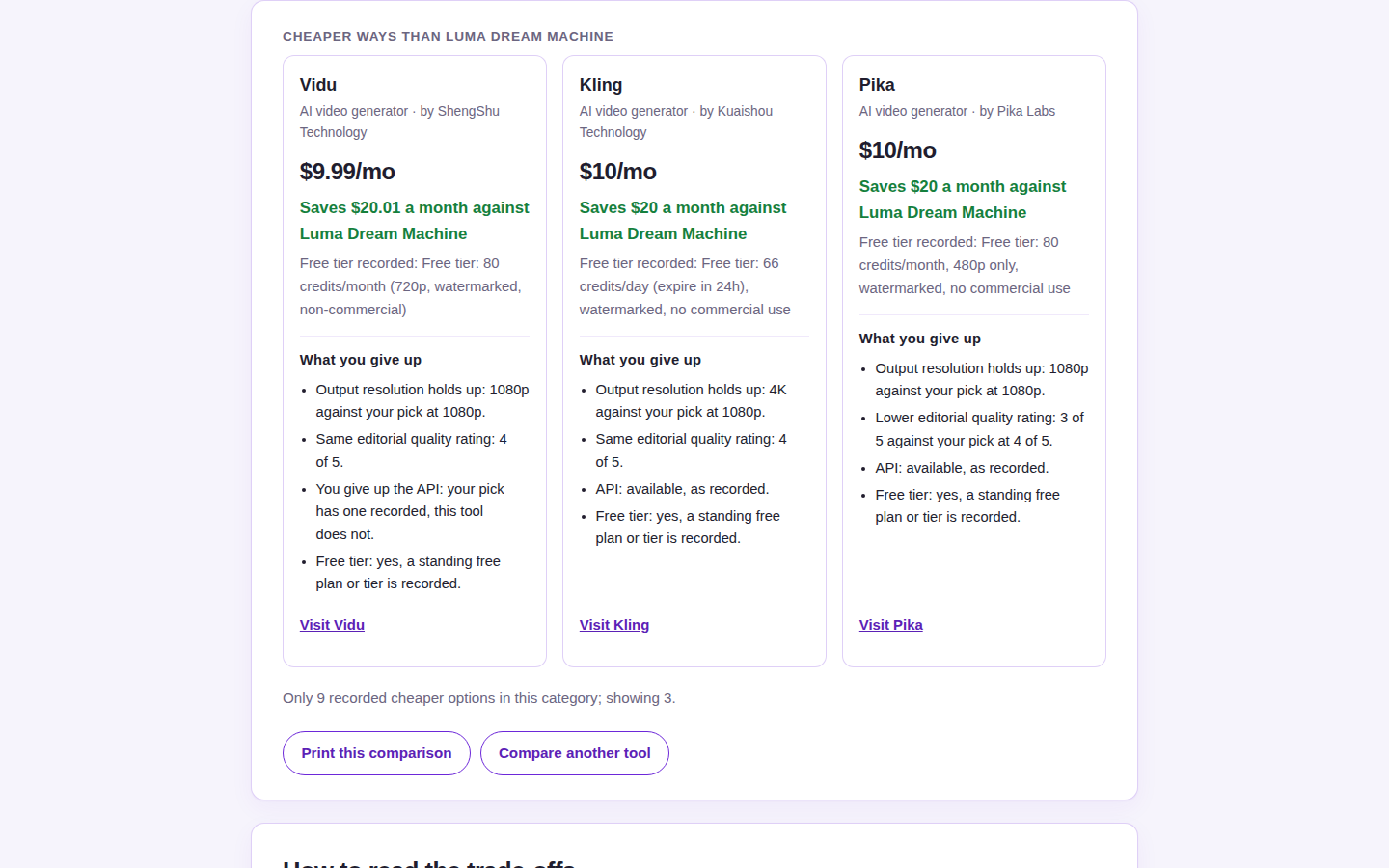
Are AI videos cheap? Sometimes, and it depends entirely on which tool you pick for the same job. Luma Dream Machine is recorded in our dataset at $30 a month. Run it through Before You Pay and three cheaper AI video generators appear: Vidu at $9.99 a month, Kling at $10, and Pika at $10. That is $20 a month back, about $240 a year, for the same category of tool.
Nine recorded cheaper options exist in that category; the checker shows three. The specific winners matter less than the checks behind them. Here are the 7 we run before paying for any AI media tool.
1. Check the recorded price, not the launch price
Launch prices expire. The dataset behind the checker was last verified on September 13, 2026, and it records what each tool actually charges per month. Image to video pricing only means something when both sides have a recorded figure; when one side has none, the checker says so and shows no saving.
2. Run your current tool before you renew
Renewal is the expensive habit. Before a subscription rolls over, run the tool through the checker once and see what the same job costs elsewhere. The short version of the tool itself is in our explainer, Before You Pay: a free checker for AI video prices.
3. Read what you give up
Cheaper is never free of trade-offs. Against Luma, Vidu gives up the API that Luma records. Pika drops the editorial quality rating to 3 of 5 against Luma at 4 of 5. The checker keeps those flags visible on every card instead of silently dropping candidates or silently passing them.
4. Exhaust the free tier first
Vidu records a free tier of 80 credits a month at 720p. Kling records 66 credits a day. For drafts, tests, and short clips, that can be the whole job. Our posts on generators with a real free tier and free AI dubbing tiers show what those tiers really buy.
5. Match resolution to the job
Kling records 4K output against Luma at 1080p. If your deliverable is 1080p, paying extra for resolution you never ship is waste. The flip side is in our post on whether you actually need 4K output.
6. Check commercial use before client work
The recorded free tiers above are watermarked and non-commercial. Fine for a draft, a problem on a paid deliverable. Read our license-first guide to using AI images commercially before a client job rides on a free plan.
7. Re-check every quarter
Prices move too fast for a one-time decision. Re-run the comparison each quarter, print it from the results screen if you keep records, and treat the vendor page as the final word: Runway's pricing page for Runway, and so on. The framing work around the video is also free elsewhere in the fleet: Story Frame Maker at EasyImageVideo frames vertical clips, and Thumbnail Canvas handles the thumbnail.
Start with the tool you already pay for: check it in Before You Pay and see what the same job costs today.