

Businesses evaluating workflow builders usually compare triggers, integrations, and price. The comparison that decides whether the workflow is worth anything happens at the far end: the output. An AI video editing tools comparison that ignores the published output spec is comparing plumbing without checking what comes out of the tap, and our database of 114 AI media tools shows how uneven that far end really is.
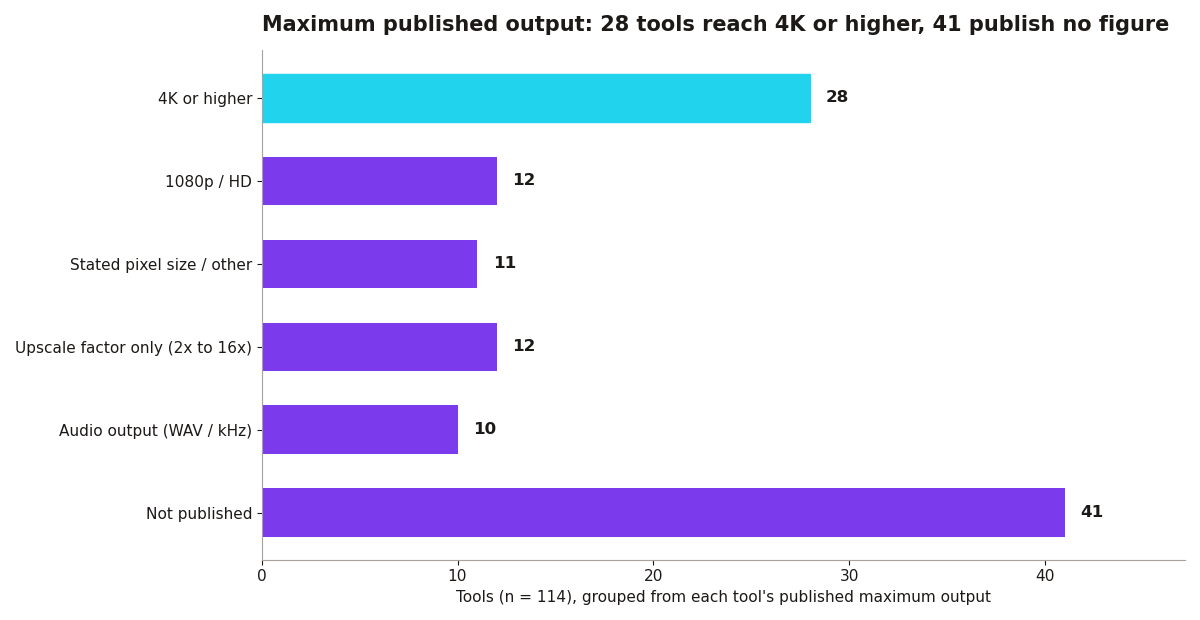
The output spread, counted. Of the 114 tools, 28 publish a maximum output of 4K or higher. Twelve publish 1080p or HD, twelve state a pixel size or another figure, eleven state only an upscale factor between 2x and 16x, and ten are audio tools publishing WAV or sample-rate figures. The number that should stop a buyer mid-comparison is 41: forty one tools publish no maximum output figure at all. Inside the video editor category itself, 9 of the 14 tools publish 4K output, 4 publish nothing, and one (Reduct.video) publishes 2K. Across video generators and editors combined, 14 of 28 reach 4K or higher and 7 sit at 1080p or HD. If a step in your workflow cannot state its output ceiling, the workflow's ceiling is unknown too.
The builders themselves. Zapier: 8,000+ integrations, now with AI steps; the default for simple automations, with pricing that scales with task volume. Make: visual workflow builder, better value than Zapier at volume, and strong for multi-step media pipelines. Gumloop: AI-native automation with built-in model steps, good for document and media workflows. Relay.app: human-in-the-loop automation, useful when AI output needs approval before publishing. Lindy: AI agents that execute multi-step tasks from natural language descriptions.
Where the two comparisons meet. A media pipeline is a chain of tools, and 8 of the 14 video editors in the database expose an API, which is what lets a builder move media between steps without manual downloads. When you assemble the chain, work backwards from the deliverable. Fix the required output spec first (say, 4K masters with 1080p social cuts), then admit only steps that publish a ceiling at or above it, then choose the builder that connects them most reliably. Steps that publish no figure are not automatically bad tools, but they are unverifiable links, and unverifiable links belong in experiments, not in production workflows.
What businesses actually automate. Lead enrichment, content repurposing pipelines (video to clips to posts), review triage, and reporting. The comparison that matters is not features but reliability: does the workflow run 1,000 times without babysitting?
The audio steps hide in the same trap. Ten of the 114 tools are audio tools whose published maximum is a WAV export or a sample rate rather than a resolution, and media workflows increasingly include them: a generated video gets a generated voice, which gets cleaned, leveled, and exported. Those steps publish their ceilings in kilohertz instead of pixels, which makes cross-tool comparison awkward, and awkward comparisons are exactly where workflow quality quietly degrades. When you document a pipeline, record every step's ceiling in whatever unit that step uses, and mark the steps that publish nothing. A chain with three unpublished ceilings is not a pipeline yet. It is a hope with integrations.
A buyer's checklist from the data. First, does each tool publish its maximum output? If 41 of 114 do not, expect to ask vendors directly, and treat evasive answers as a no. Second, does the tool expose an API? Across the whole database 76 of 114 do, so requiring one does not shrink your options much, and it is the difference between a workflow and a sequence of browser tabs. Third, what is the recorded pricing model? Freemium tools (77 of 114) let you prototype the chain at zero cost and pay only where the chain proves itself. Builders like Make and Zapier sit on top of this landscape; they do not replace the homework underneath it.
Start narrow, and price the chain. Start with one workflow that hurts weekly, build it in Make or Zapier, measure the hours saved, then expand. The failure mode is automating ten things shallowly instead of one thing completely. Before you commit the business to a paid tier anywhere in the chain, run the key tool through the Before You Pay checker and confirm the per-video cost still works at the volume the workflow will actually produce. Depth first, breadth later, and a stated output spec at every step.