

Teams get productive with AI media tools through systems, not licenses. But the system has to be built on the right map of what is actually out there, and that map is bigger than most training plans assume. Our AI media tool pricing and capability database API tracks 114 tools across ten categories, and the spread explains why teams stall: there is no single stack to learn, only a category landscape to choose from deliberately.
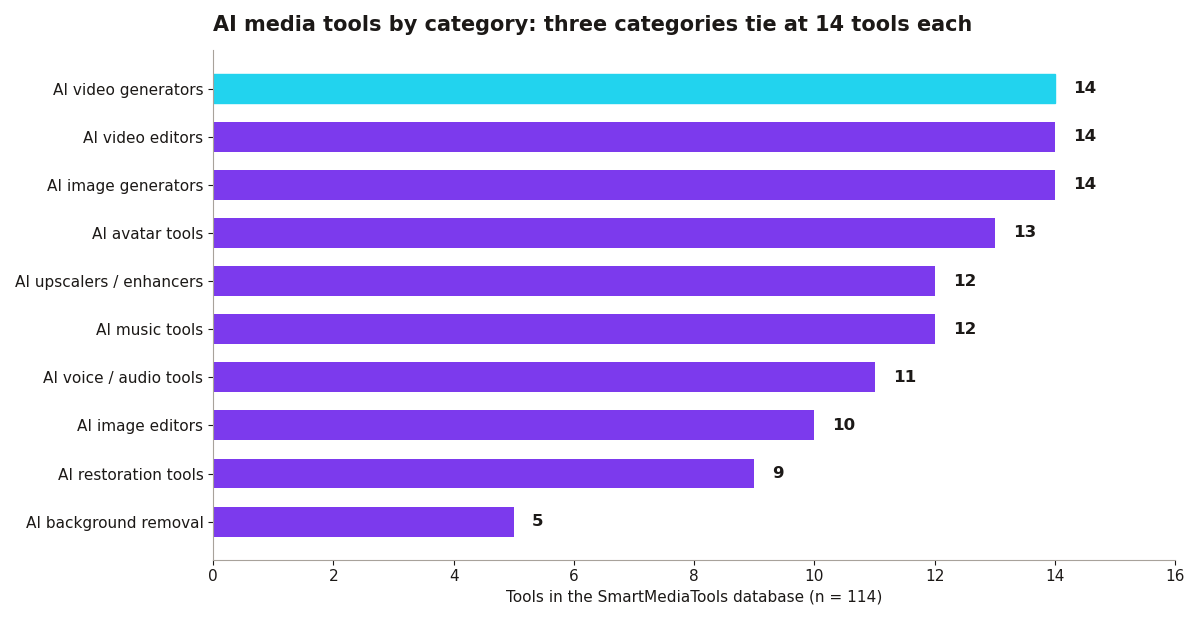
What the category map means for training. Three categories tie at the top with 14 tools each: AI image generators, AI video editors, and AI video generators. Avatar tools follow at 13, music and upscalers at 12 each, voice and audio at 11, image editors at 10, restoration at 9, and background removal at 5. For a training lead, the practical reading is this: your team does not need exposure to 114 tools. It needs one confident pick in the three or four categories your work actually touches, and the database shows every one of those categories has at least nine credible options competing for that slot. Choice is not the bottleneck. Depth is.
The API layer is the quiet training multiplier. Of the 114 tools in the database, 76 expose an API. That matters for team training because the tools your people learn individually become far more valuable when a workflow can call them in sequence: generate, dub, edit, export. When you pick the stack, check the API flag alongside the feature list. A slightly weaker tool with a solid API often trains a team faster than a stronger tool that only works through manual uploads, because the manual steps are where weekly output goes to die.
Pick one stack. HeyGen plus ElevenLabs plus Descript covers avatars, voice, and editing. Three tools learned deeply beat ten tools tried once. The database backs the instinct: avatar, voice, and video editing are three separate categories with 13, 11, and 14 tools respectively, and no single product covers all three well. Commit to one per category and write the choice down.
Build a prompt and script library. The team's best prompts, hooks, and brand voices live in a shared doc. This is the actual asset. Tools change pricing and models every quarter; a library of what works for your brand survives every swap.
Assign a tool owner per tool. One person goes deep on HeyGen, another on ElevenLabs. Internal experts beat vendor webinars, because your expert learns the tool against your footage, your scripts, and your deadlines, not a demo reel.
Run a weekly show-and-tell. Fifteen minutes of what worked this week compounds faster than any course. Pair it with the database: when someone finds a better tool in a category, the team can compare its recorded pricing model and capabilities against the current pick in minutes instead of starting a fresh research project.
Set brand guardrails early. Approved avatars, voice settings, and disclosure standards before the first publish. On vendors: Synthesia's enterprise tier includes SCORM and LMS integration for formal training programs. Colossyan is the budget training pick. But the software is the easy part.
Budgeting the stack is a training task too. The database records the pricing model for every tool, and 77 of the 114 run freemium, which is good news for pilots: most categories let a team train on the free rung before any budget request exists. Twenty four tools are straight subscriptions, eight charge pay per use, and three are one-time purchases. A sensible rollout uses that structure. Pilot on freemium tools while the team learns, convert the two or three categories that prove themselves into subscriptions, and keep pay-per-use tools for spiky work like restoration or background removal, where 9 and 5 tools respectively give you options without a monthly commitment. Training plans that ignore the pricing model tend to produce a familiar result: a team trained on tools the company then refuses to renew.
Do not forget the long tail categories. Restoration (9 tools) and background removal (5 tools) rarely headline a training program, but they are the categories where a single skilled operator saves the most visible time, because the manual alternative is frame-by-frame work. The category map also warns against one common mistake: training everyone on the fashionable category. Fourteen video generators compete for attention, but if your team's bottleneck is editing, the 14 video editors deserve the training hours instead. Let the work, counted honestly, pick the categories.
Check the price before the rollout. Training a team on a tool you later drop over pricing wastes the whole investment. Run any candidate through the Before You Pay checker first, and compare its pricing model against the category norm in the database. Buy the tools on Monday, build the system by Friday, or the licenses gather dust like every other SaaS purchase.